
How to Deposit at WinSpin from Canada
The short version
Funding a WinSpin account is not complicated. What is complicated is that nobody outside a logged-in Canadian account can tell you which methods you will be offered, because the cashier is built by JavaScript after login and its contents depend on your country. So this page does the useful thing instead: it walks the sequence that holds regardless of method, flags the decisions that are expensive to get wrong, and is explicit about the parts that are unknowable from here.
What the operator confirms about deposits
WinSpin's own public statements on this subject amount to three sentences. Players can deposit and withdraw in Bitcoin, Ethereum, Litecoin and other cryptocurrencies. There are over 20 payment methods in total. And the site describes itself as being for "users who want to deposit with crypto and play with fiat".
Read carefully, that positioning is informative. Crypto is the deposit rail the operator leads with, and fiat is described as the currency you play in rather than the currency you fund with. Whether Canadian fiat deposits are supported at all, and through which providers, is simply not stated — not on the homepage, not in the sitemap, not anywhere externally readable. Any page listing you Canadian bank or card options at WinSpin with minimums and clearing times has manufactured them.
| Question | Answer available before login? |
|---|---|
| Are Bitcoin, Ethereum, Litecoin accepted? | Yes — named by the operator |
| Which other coins? | No — "other cryptocurrencies", never itemised |
| Which Canadian fiat methods? | No — not published anywhere |
| Minimum deposit | No — cashier only |
| Deposit fees | No — cashier only |
| Which methods qualify for the bonus | No — offer page at the point of claim |

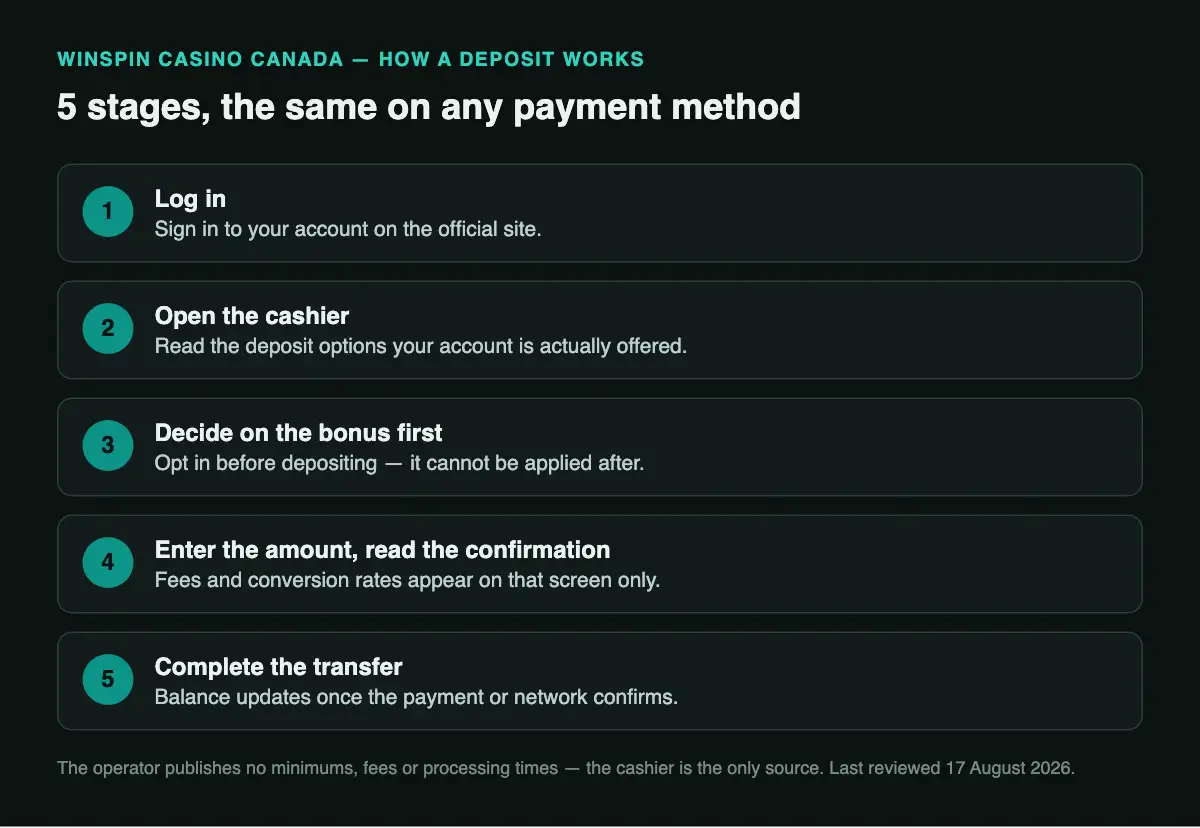
The deposit sequence, step by step
-
1. Log in to the official site
Reach the casino through a link you trust and sign in. If you do not have an account yet, start with registration — and register with details that match your government ID, because those details are what verification will later be checked against. A name mismatch discovered at withdrawal is the single most common self-inflicted delay.
-
2. Open the cashier and read it before you touch anything
The deposit view lists the methods actually available to your account. Compare it with the withdrawal view in the same session, because the two lists are often not identical, and the withdrawal side is the one that matters when you are trying to get paid.
-
3. Decide about the bonus first, not second
If you intend to claim the 120% up to C$5,000 + 250 Free Spins offer, check its qualifying minimum and any excluded payment types before you fund. Bonuses generally cannot be applied retroactively to a deposit already made, and asking support to reverse that is a poor use of everyone's afternoon.
-
4. Enter the amount and read the confirmation screen
The confirmation step is where any casino-side fee, conversion rate or minimum-violation warning appears. It is the one screen in the flow that contains numbers the operator does not publish anywhere else, and it is the one most people click past.
-
5. Complete the transfer and wait for confirmation
On a crypto rail this means sending from your wallet or exchange to the address shown, and waiting for the required number of network confirmations. On any fiat rail it means completing whatever authorisation the provider asks for. Do not close the cashier until the balance updates or the transaction shows as pending.

If you are depositing crypto for the first time
Crypto is the rail WinSpin actually documents, so it is worth spelling out what the process looks like for someone who has not done it. You buy the coin on an exchange, you withdraw it from that exchange to the deposit address the casino generates for you, and after a number of network confirmations the casino credits your balance.
Three things go wrong, reliably and expensively:
The address and the network
Copy the deposit address rather than typing it, and confirm the network matches — sending an asset over the wrong chain is the most common way funds vanish permanently. There is no chargeback, no support ticket and no recovery. Where the casino offers a QR code, use it.
The fee you did not budget for
Your exchange charges a withdrawal fee and the blockchain charges a network fee. Neither is set by the casino. If you send exactly the minimum deposit, fees can take you under it and the deposit may sit unprocessed until you top it up.
Confirmation time is not instant
Depending on chain and congestion, confirmation takes anywhere from seconds to a considerable wait. The casino sets how many confirmations it requires and does not publish that number. A pending deposit is normal; a pending deposit after several hours is worth a support ticket.
And the tax point
In Canada, disposing of cryptocurrency can be a taxable event in its own right, independently of anything that happens to the money afterwards at the casino. That is your responsibility to track, and it is a genuine cost of using this rail rather than a footnote.
Common deposit problems
| Symptom | Usual cause |
|---|---|
| The method you wanted is not listed | Country restriction or a processor relationship that has lapsed. The cashier reflects what is live right now, not what a review page said last year. |
| Deposit declined by your provider | Fiat providers frequently block gambling merchant categories. This is a decision on their side, not the casino's, and support cannot override it. |
| Deposit went through but no bonus | Either you did not opt in before depositing, the amount was under the qualifying minimum, or your method was excluded from the offer. |
| Crypto sent but balance unchanged | Waiting on network confirmations, or sent on the wrong chain. The first resolves itself; the second usually does not. |
| Amount credited is less than sent | Network and exchange fees, plus any conversion into your account currency. Check the confirmation screen figures against your wallet's outgoing record. |
FAQ
What is the minimum deposit at WinSpin?
Not published outside the cashier, and it may differ per method. The qualifying minimum for the welcome offer is a separate figure shown on the offer page.
Can I deposit in Canadian dollars?
Account currency is chosen at registration from the list the operator presents, and that list is not published in advance. The affiliate offer is denominated in C$, which indicates the offer is sized for Canadian players, but it does not by itself confirm the account currency you will be assigned.
Does depositing require ID verification?
Usually not at the deposit stage. Verification is typically triggered by your first withdrawal request. Completing it early moves the delay to a moment when you are not waiting on money.
Can I change my mind and get a deposit refunded?
Treat a completed deposit as final. Reversal is at the operator's discretion, is not a published policy, and on a crypto rail is not technically possible at all.
Should I deposit crypto or fiat?
Crypto is the only rail the operator documents publicly, which makes it the more predictable choice, at the cost of network fees, exchange-rate exposure and a Canadian tax reporting obligation. If a fiat method appears in your cashier and suits you better, that is a legitimate choice — this site simply cannot tell you in advance whether one will.
18+ / 19+ depending on your province. Deposit only what you can afford to lose, and set a limit before your first transaction rather than after a bad one. ConnexOntario 1-866-531-2600, GameSense. More at responsible gambling.